
PROFESSIONAL PROJECT · LOGISTICS OPERATIONS · NDA
ParCel
Realtime Operations Manager
Every lane, every handler, every shift, in real time.
ROLE
Sr. UX/UI Design Lead · Researcher
TIMELINE
2024 · 6 months
CONTEXT
Professional · Logistics · NDA
TOOLS
Figma · FigJam · Excel

PROCESS · 6 MONTHS · 4 PHASES
Six months, four phases.
Research found the problems. The problems set the features. The features hit the floor. The floor sent us back to redraw.
01
DISCOVERY
Sit with the floor.

4 workshops · 10+ interviews · 4 management levels
02
DEFINE
Find the patterns.

3 archetypes · 4 discovered problems · 3 journey maps
03
DESIGN
Structure, then skin.
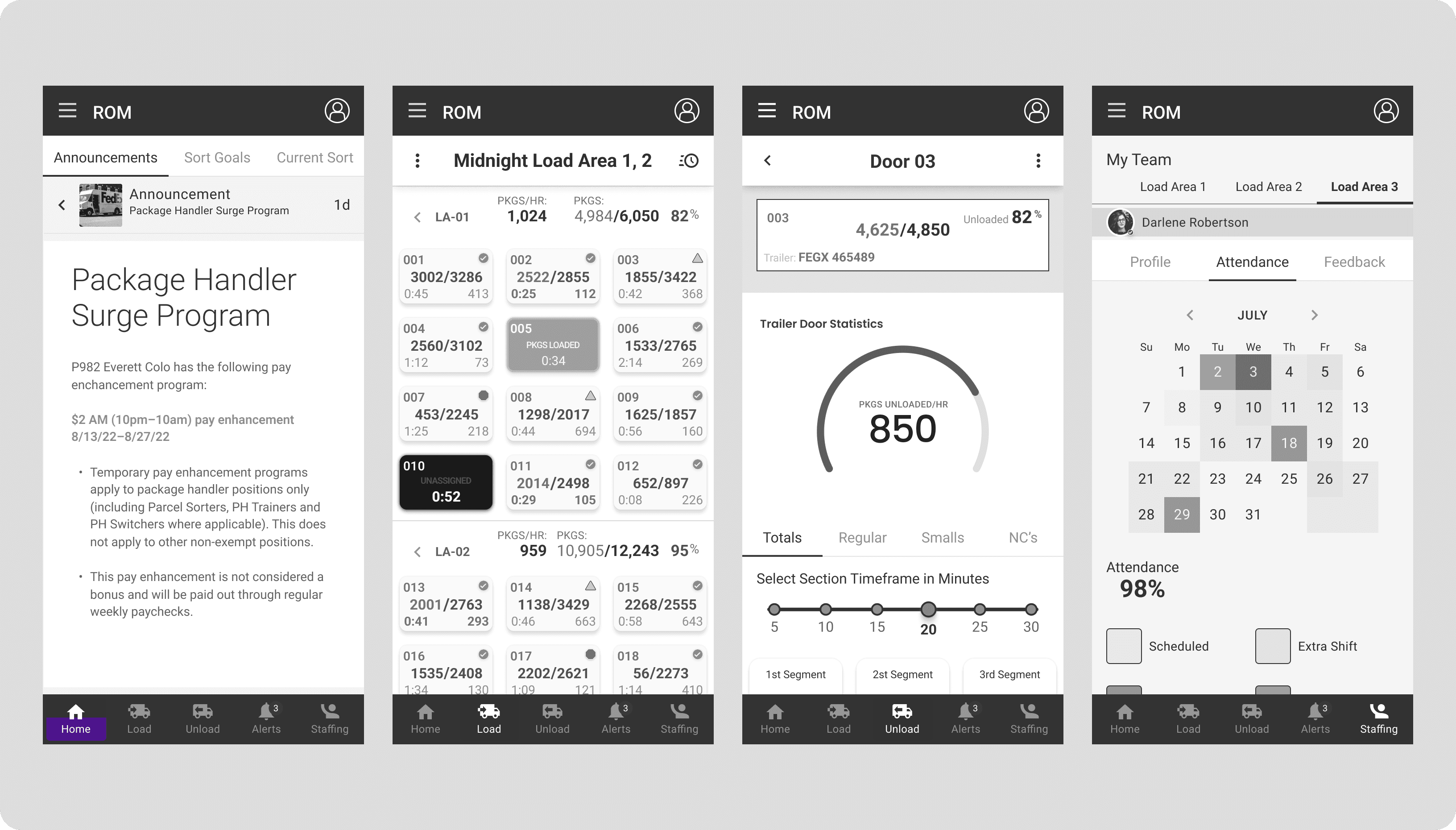
IA · lo-fi for every flow · component library · hi-fi
04
TEST & REFINE
Put it in their hands.
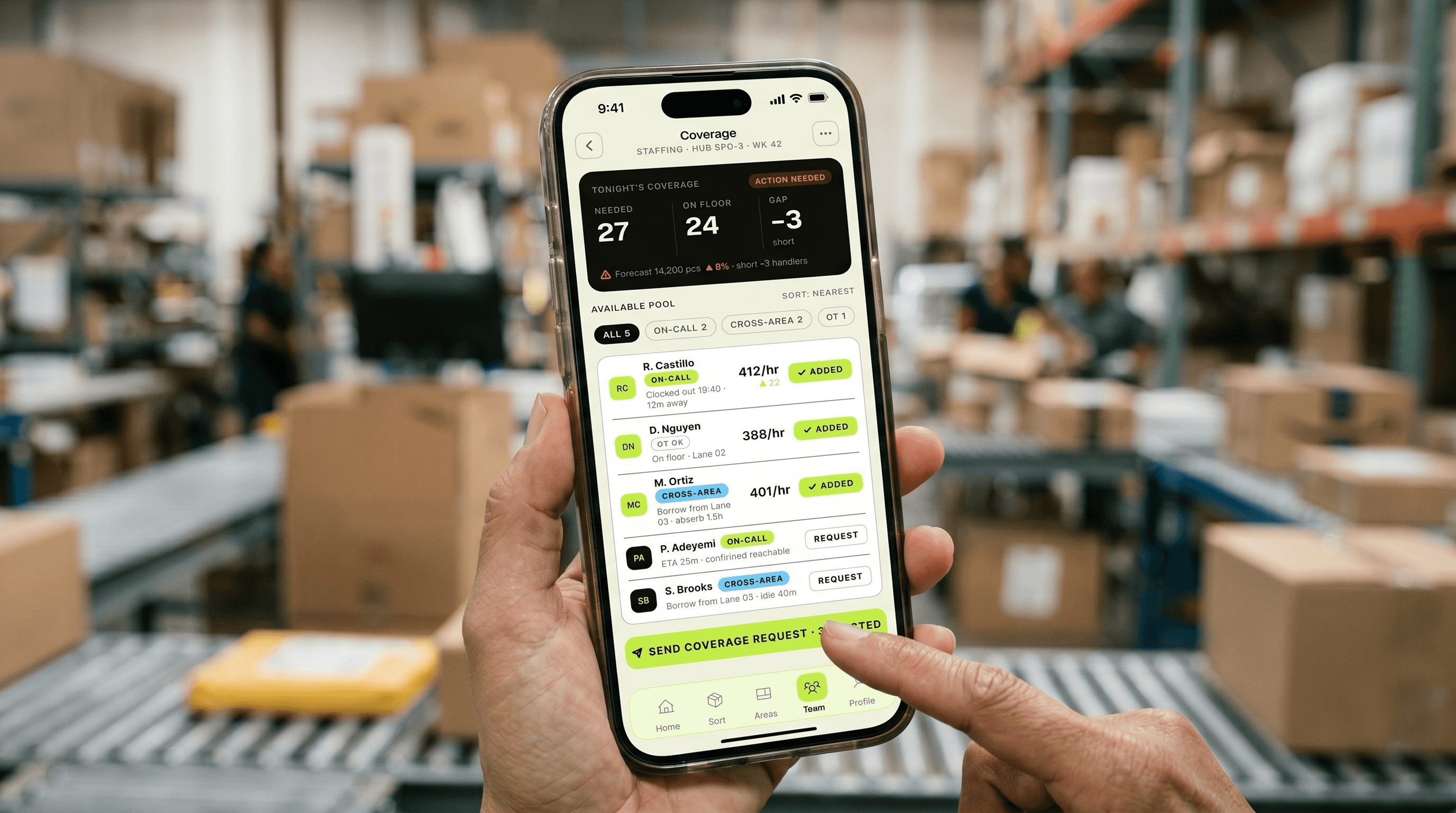
5 usability sessions · 50+ observations · 3 redesigns
THE CHALLENGE
One manager. Ten areas.
A single shared terminal.
An operations manager runs a slice of a sorting hub through the overnight volume spikes: up to ten areas, each tied to a different shipping region. To see what's coming, they walk to a shared computer terminal and wait their turn. Staffing happens on the fly, on paper. Schedules go stale the second someone no-shows. Safety checklists get printed, filled by hand, and filed in a binder. The data to run the floor was all there. It just never reached the person running the floor.
10
areas
One ops manager's span of control, each a different region
Discovery workshops
1
terminal
Shared and stationary, the only real-time view, and you queue for it
Discovery workshops
100%
paper
Daily safety checklists, printed and filed by hand
Discovery workshops
“By the time I’ve walked to the terminal and logged in, the spike’s already on top of me.”
OPERATIONS MANAGER · DISCOVERY WORKSHOP
WHY THIS EXISTS
The dock was modernizing.
The manager’s tools weren’t.
The client was modernizing the sorting dock, and the operations manager was the person every shift leaned on. They make the call when a lane falls behind, when an area runs short on handlers, when tomorrow’s volume means calling people in tonight. Every one of those calls depended on data stuck at a terminal, on paper, or in a scheduler’s head. The brief was simple to say and hard to do: put real-time, decision-grade information in the manager’s hand, let them act on it without leaving the floor, and back it with volume prediction so staffing could get ahead of the spike instead of chasing it.
THE STATUS QUO
No tool met the manager where they worked.
Every tool the manager relied on assumed they were sitting still. The volume view lived on a desktop terminal. Staffing lived in hallway conversations and paper. Scheduling lived in a system that aged by the hour. Compliance lived in a binder. Nothing was real-time, nothing was mobile, and nothing was built for the role that had to react fastest. The gap wasn’t missing data. It was data that never reached the floor.
THE CORE GAP
No tool connected live volume → the manager on the floor → an action they could take in the moment: reroute a lane, pull a handler, call in coverage. That’s the gap ParCel fills.
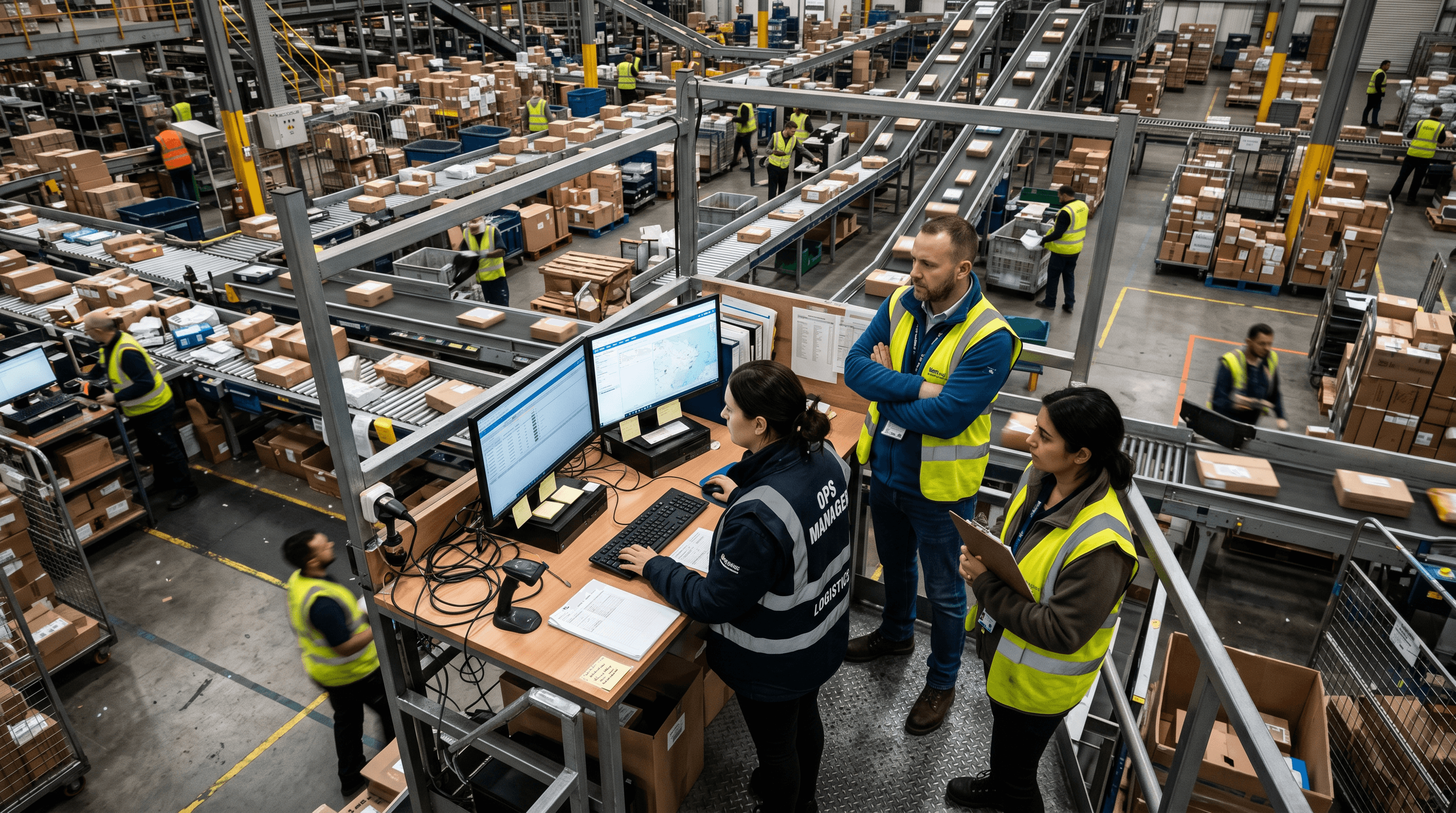
WHO IT’S FOR · 3 ARCHETYPES
Three roles, one floor.
Workshops and interviews ran the full ladder, from regional and facility managers down to the package handlers. Three archetypes came out of it, each with a different job to do. The Operations Manager is the protagonist here; the app is built around their shift.
4 workshops · 10+ interviews · 4 management levels

PRIMARY
Operations Manager
SPAN
One facility section: up to 10 areas, each a different shipping region.
OWNS
Package flow, staffing, smooth daily ops; reallocates handlers to other managers’ areas during spikes.
JOBS-TO-BE-DONE
“When I log into my dashboard, I want to see the expected package volume for today and tomorrow, and know if I have adequate staffing. If I don’t, I need a way to quickly contact available employees from a pool of resources to fill the gaps.”

SECONDARY
Facility Manager
OWNS
The larger flow of packages in and out of the whole facility; builds systems and tackles structural problems.
JOBS-TO-BE-DONE
“When I log into my dashboard, I want to see any impacts on volume flow, including predicted spikes for the day, days, weeks, and months, so I can staff accordingly.”

RESOURCE
Package Handler
ROLE
The core floor workforce the manager schedules, reallocates, and supports.
TOUCHPOINTS
Shift performance inputs, punch-in correction, coverage requests, feedback.
JOBS-TO-BE-DONE
“When I start my shift, I want my punch-in to be right and to see which area I’m on, so I can get to work without tracking down a manager.”
RESEARCH SYNTHESIS · AFFINITY MAP
Everything we heard, clustered.
Workshop and interview notes went up on an affinity board, and the themes sorted themselves out. Four of them shaped the MVP and became ParCel’s discovered problems. The rest set the tone, the defaults, and the things we chose to leave out.
01
The terminal bottleneck
Managers queue for a shared, stationary terminal, with no quick real-time view of incoming volume.
→ Real-time home + sort
02
Staffing on the fly
No way to manage handlers live during a spike; clunky shift inputs; double punch-ins at shift start are a pain to fix.
→ Coverage from a resource pool
03
Schedules that age
Schedules go stale fast; no-shows are hard to backfill; no way to forecast staffing against expected volume.
→ Volume forecast + scheduling
04
Paper safety checks
Daily checklists on paper; no record when an incident happens; missed checks stay invisible.
→ Digital checklist + incident audit

6 Participants | 7 Clusters
Affinity Map
IDEATION · PROBLEM → FEATURE
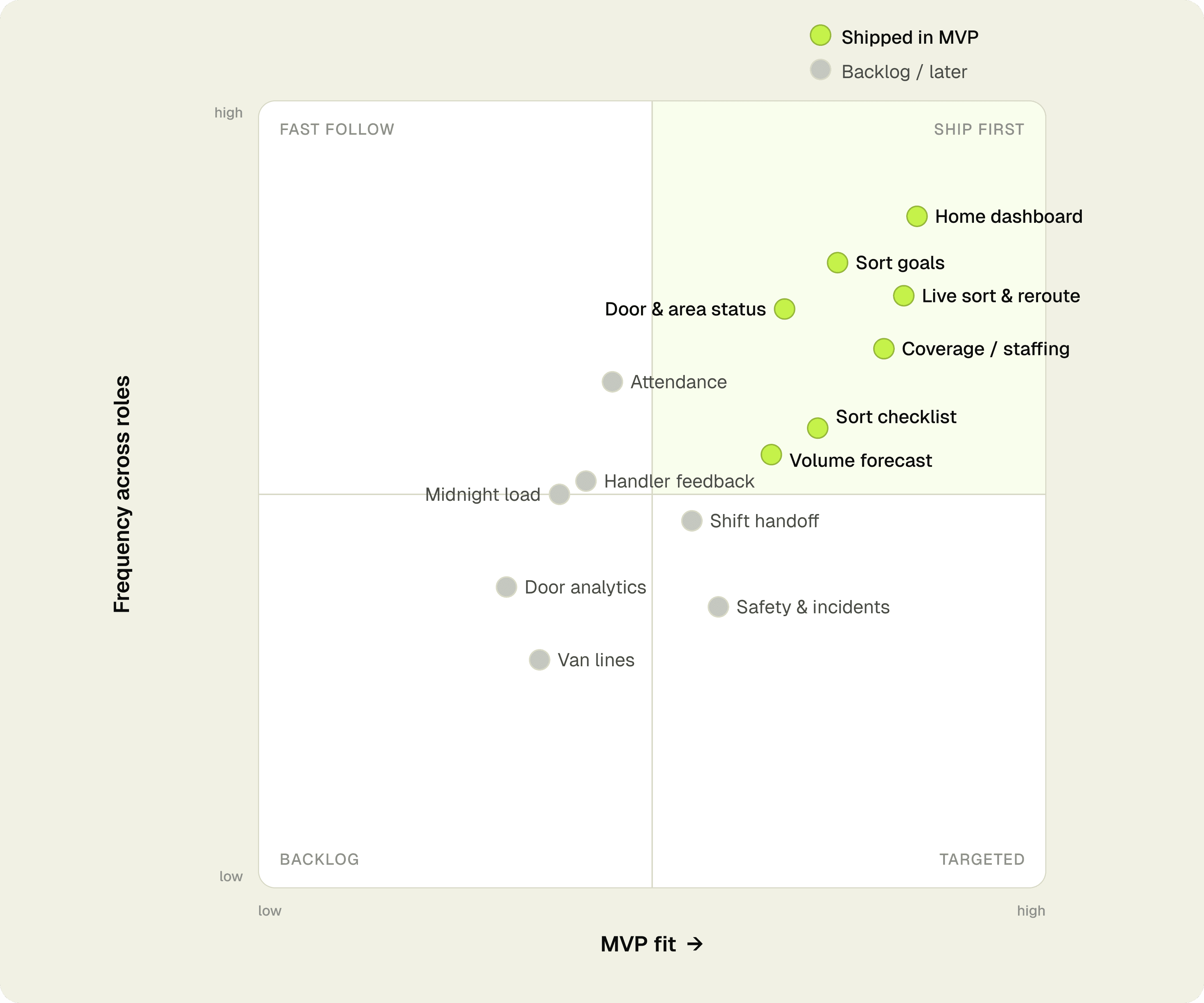
From many problems to main features.
Every problem got scored on two questions: how often did it come up across roles, and could a mobile feature actually fix it inside MVP scope? The four that scored highest became the build. The rest became backlog.
PROBLEM 01
Terminal bottleneck
Live Sort & Volume
The shift, in real time, in one hand.
PROBLEM 02
Staffing on the fly
Coverage Pool
See the gap, contact available staff, fill it.
PROBLEM 03
Schedules that age
Volume Forecast
Today and tomorrow’s volume against your staffing.
PROBLEM 04
Paper safety checks
Digital Checklist
Completion tracked, incidents auditable.
THE FRAMEWORK · 4 FEATURES
Four features, one shift.
ParCel turns a manager’s night into four jobs it does well. Each one traces straight back to a discovered problem.
01
LIVE
Sort & Volume
Real-time sort progress, hourly burndown, lane-by-lane status. Replaces the terminal.
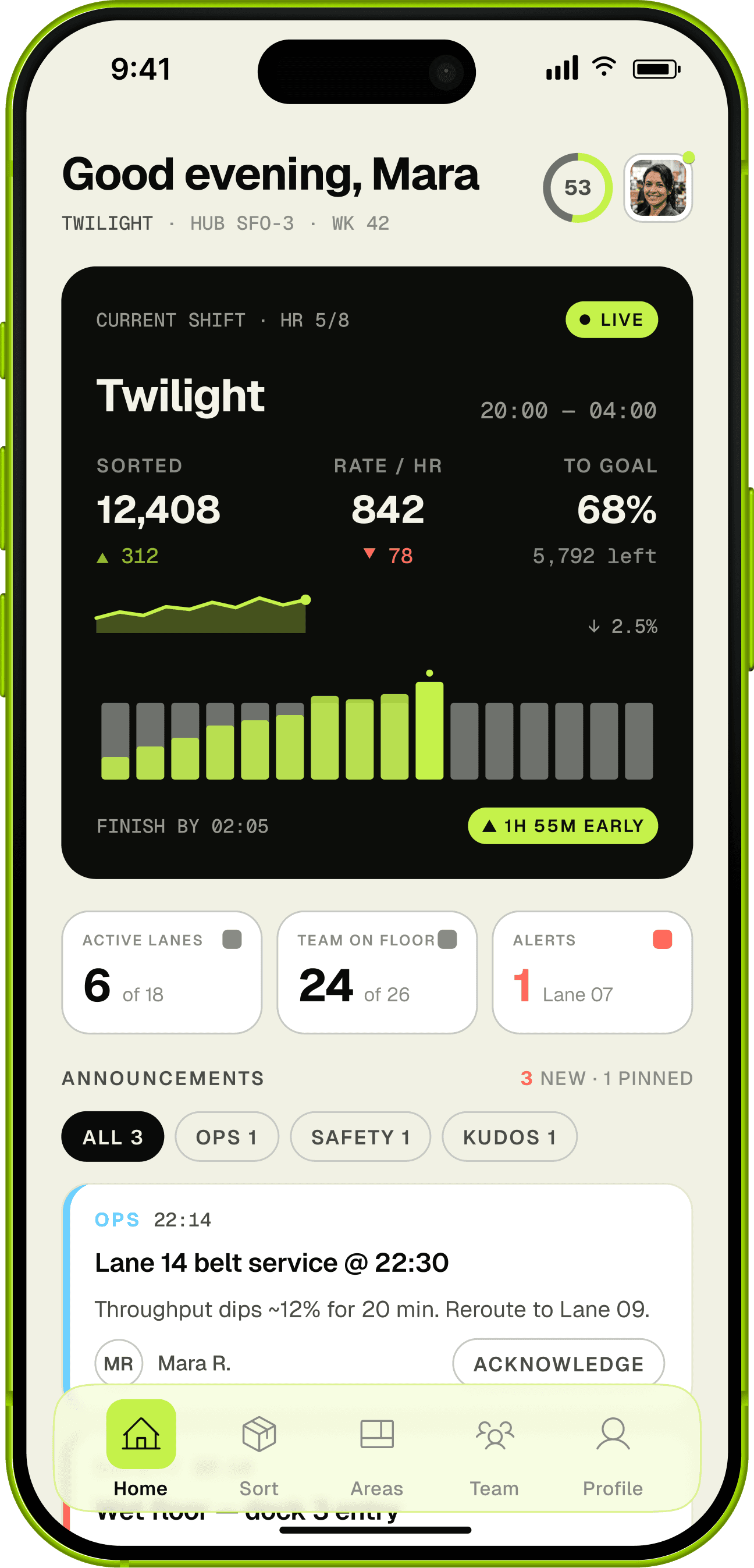
FLOW
Sort-Volume
·
DASHBOARD
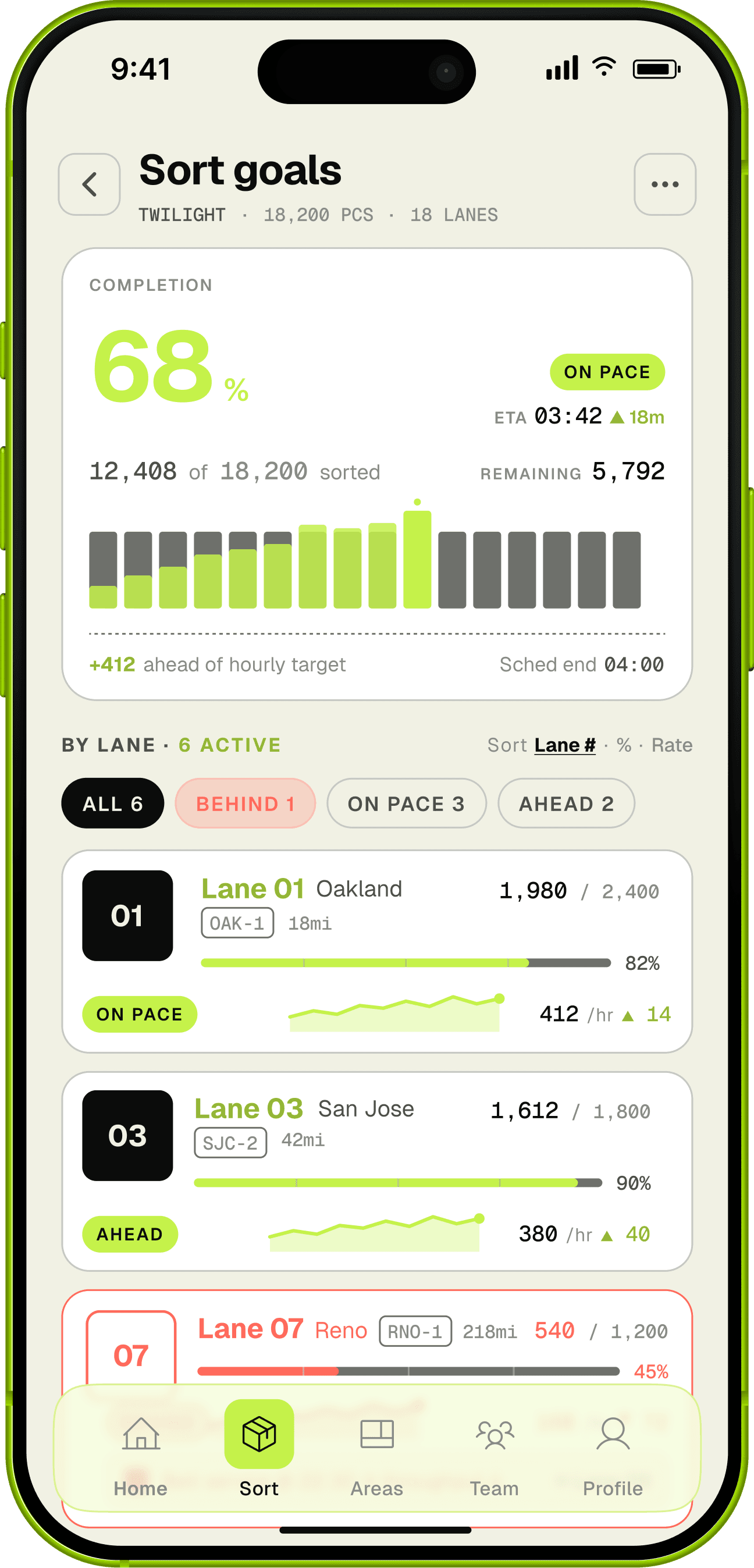
FLOW
Sort-Volume
·
Sort Goals

FLOW
Sort-Volume
·
Current Sort
02
COVERAGE
Resource Pool
See understaffed areas, contact available handlers from a pool, confirm coverage. The core job-to-be-done.
ANCHOR SCREENS
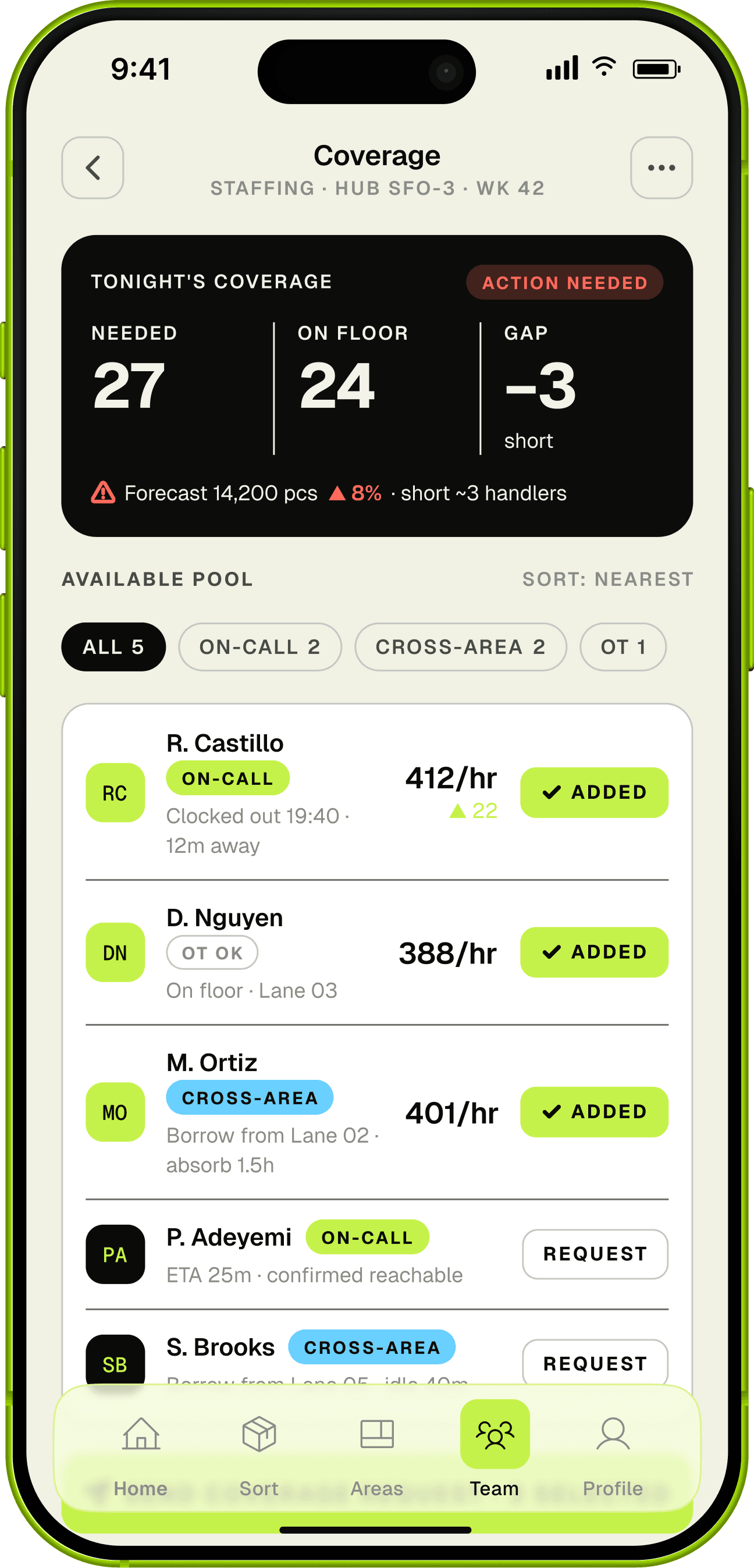
FLOW
Resource Pool
·
Coverage
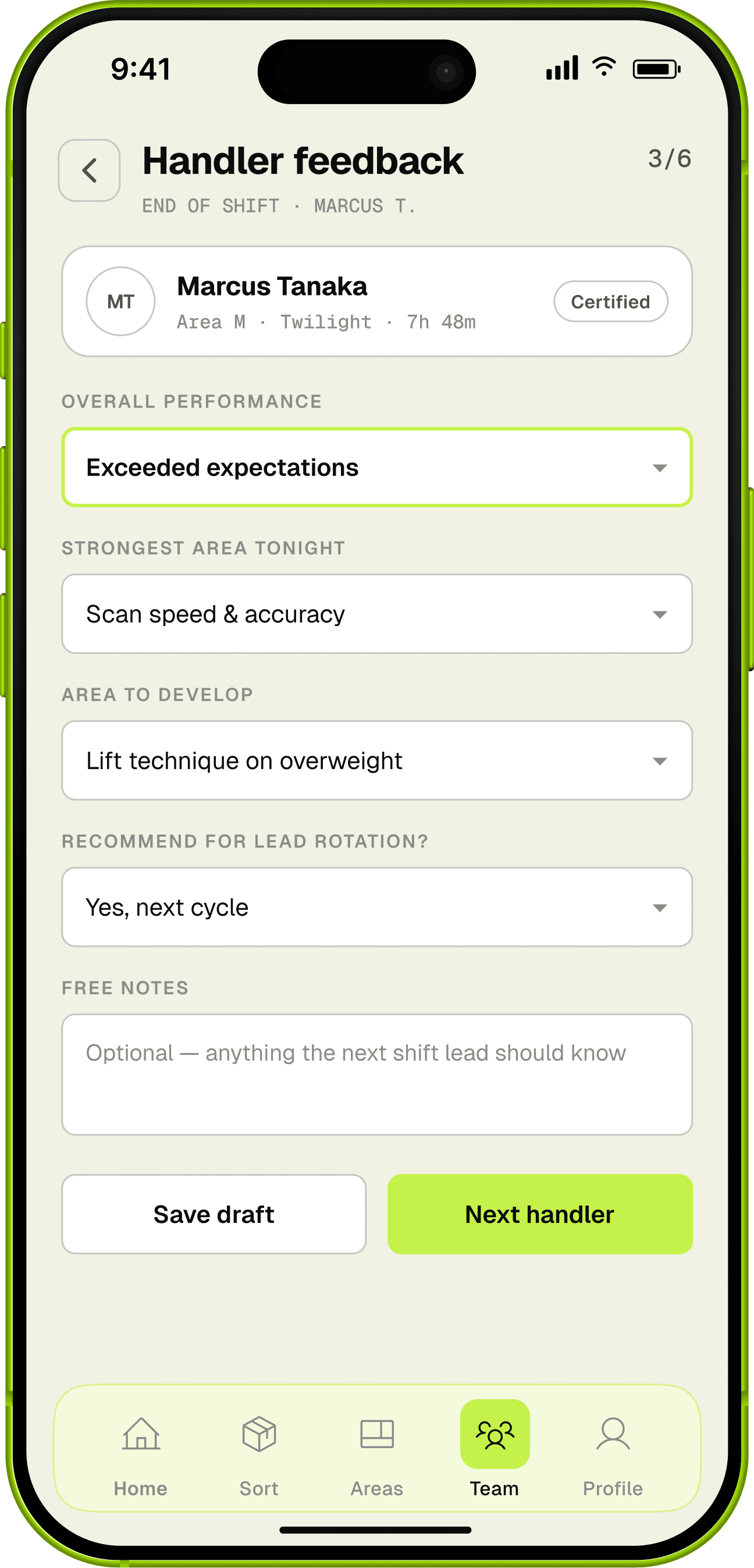
FLOW
Resource Pool
·
Handler Feedback
03
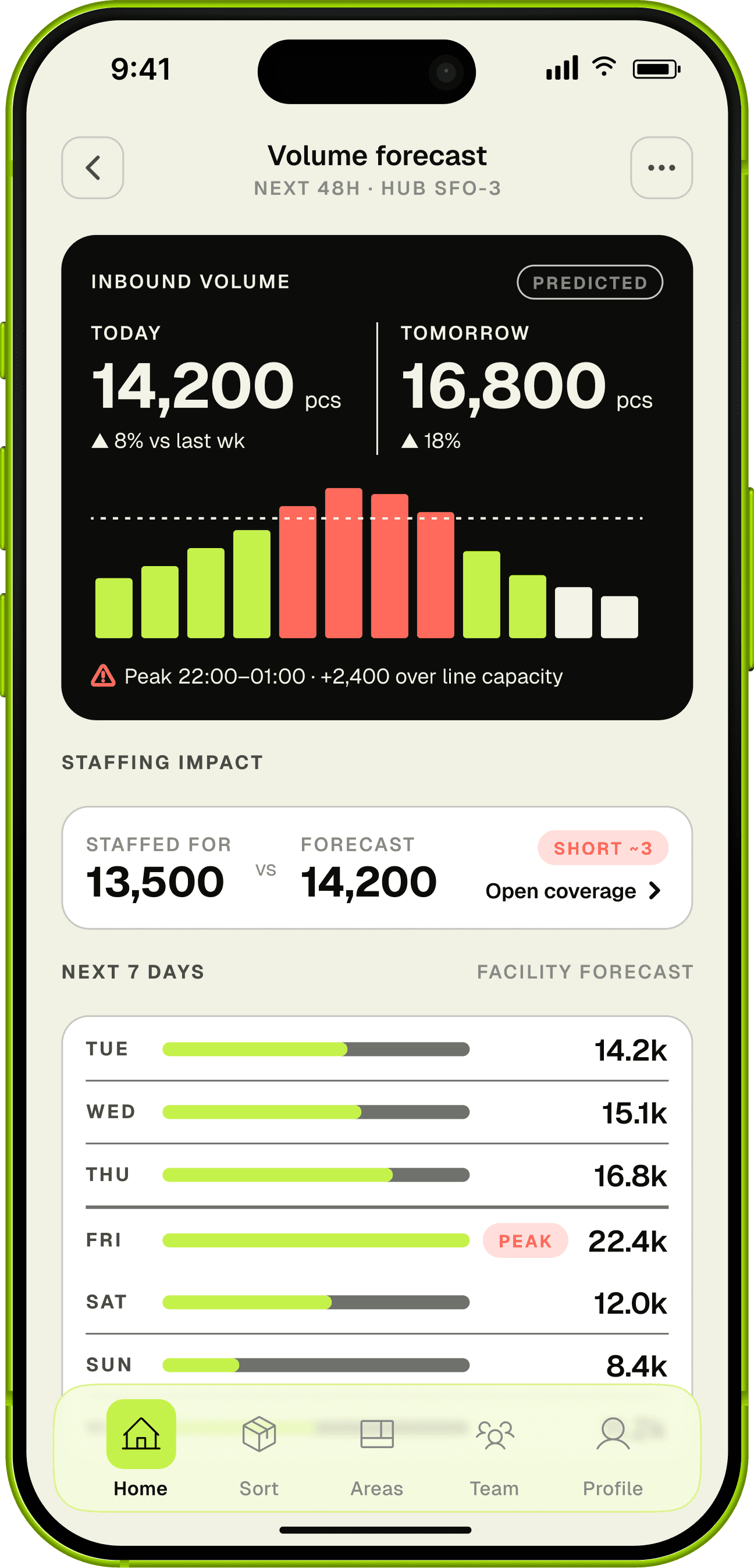
FORECAST
Volume ahead
Predicted volume today and tomorrow against current staffing, so you get ahead of the spike instead of chasing it.
ANCHOR SCREENS
FLOW
Volume
·
Volume Forecast
04
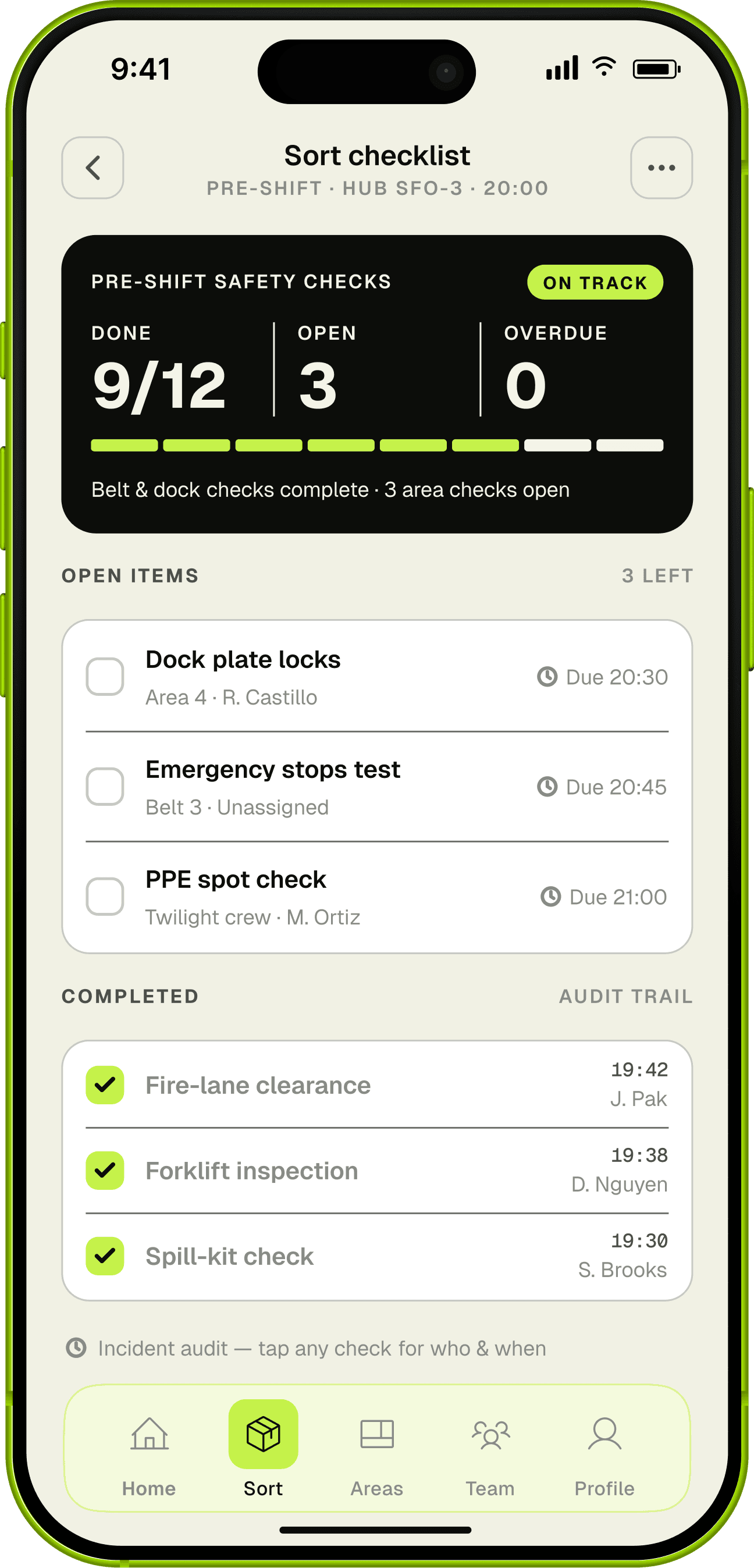
SAFETY
Digital checklist
Daily safety checks done in-app, visible to managers, auditable after an incident.
ANCHOR SCREENS
FLOW
Digital Checklist
·
Sort Checklist
FLOW
Digital Checklist
·
Handler Feedback
Supporting flows: Attendance · Shift handoff · Doors · Van lines · Midnight load · Door stats
CONCEPT EVOLUTION · DIRECTIONS CONSIDERED
A few directions we tried first.
Before the four-feature mobile tool, a few other directions got explored. Two were tried and dropped. One was right, but out of scope for this release.
REJECTED
Desktop web dashboard
TRIED IT BECAUSE
The project started life as a desktop web app, the obvious home for a data-dense ops dashboard.
IT FAILED BECAUSE
Managers don’t sit at a desk during a spike; they’re out on the floor. A desktop tool just rebuilt the terminal bottleneck it was meant to kill.
WHAT SURVIVED
The move to Android mobile, glanceable and one-handed at the point of work. That pivot turned out to be the project’s biggest insight.
REJECTED
Spatial hub-map metaphor
TRIED IT BECAUSE
A literal map of the facility’s areas and lanes felt like the intuitive way to show flow.
IT FAILED BECAUSE
It didn’t shrink to a phone, and managers thought in lanes and status, not geography.
WHAT SURVIVED
The lane row and the status grammar (ON PACE / AHEAD / BEHIND) instead of a map. Spatial layout is parked for a possible iPad or kiosk version.
DEFERRED · OUT OF SCOPE
Automated staff reassignment
THE IDEA
If the app already knows volume and availability, it could reassign handlers on its own.
WHY WE PARKED IT
Managers wanted to keep the call and the relationship: an action they trigger, not one done to their crew. It also sat outside MVP scope.
WHAT SHIPPED INSTEAD
The Coverage request flow. The app finds the gap and the pool; the manager makes the move. Auto-assignment lives in the backlog.
WIREFRAMES · LO-FI
Four flows, framed early.
Each feature became a flow, wireframed at phone width with auto-layout from the first sketch so the structure carried into hi-fi unchanged. Below, the payoff screen from each flow.
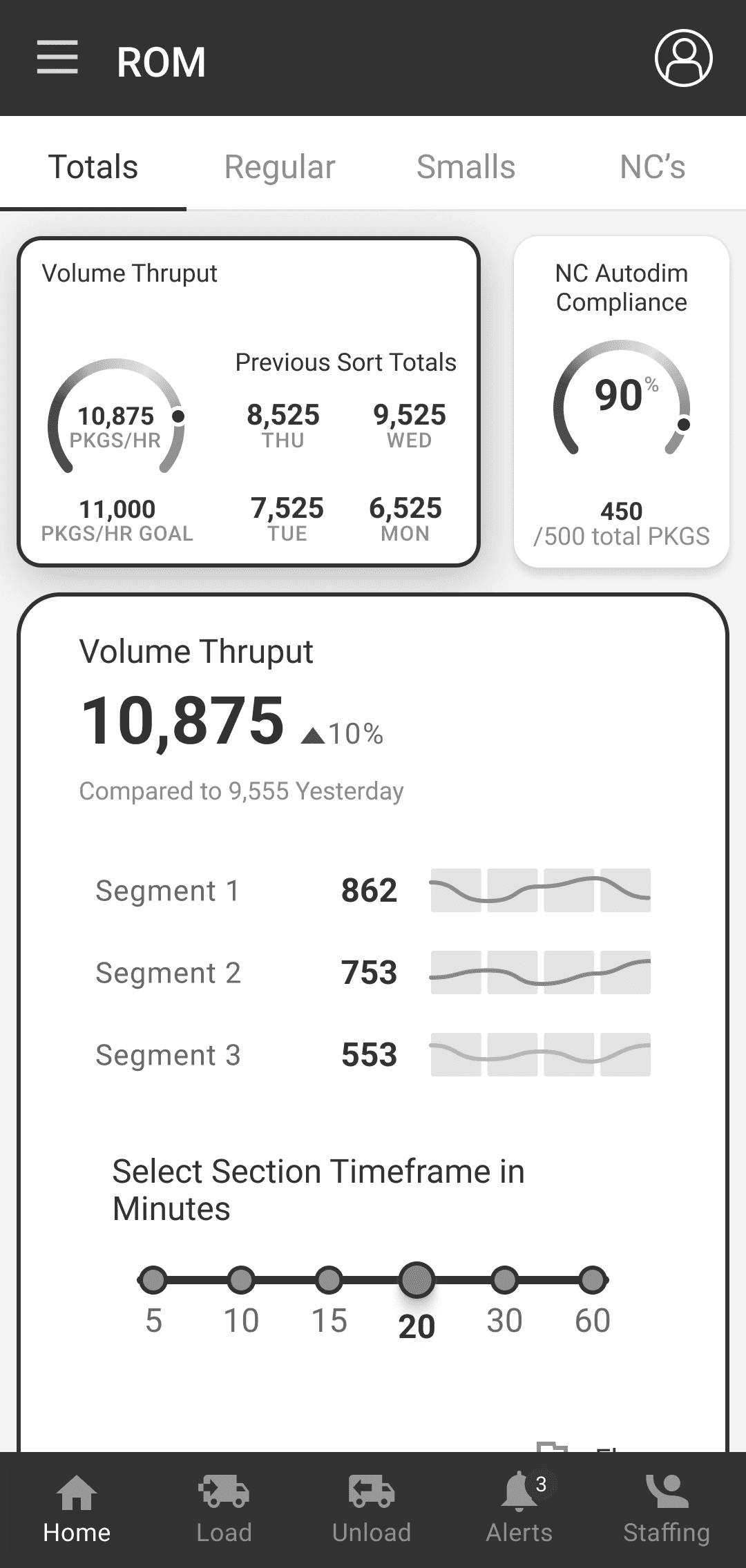
FLOW 01
Live Sort & Volume
Payoff: the Home shift card
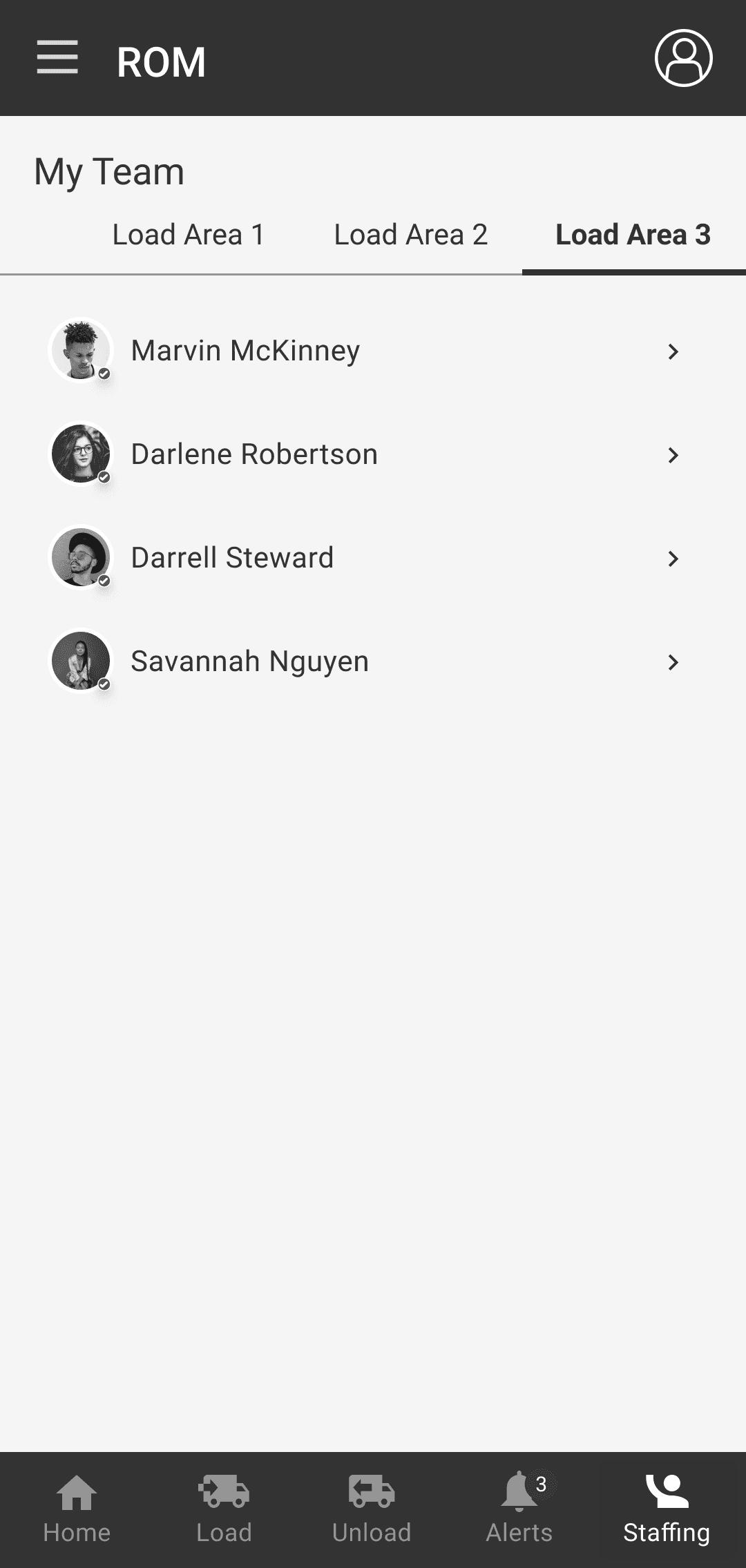
FLOW 02
Coverage Pool
Payoff: contact-the-pool confirmation
FLOW 03
Volume Forecast
Payoff: tomorrow vs. staffing
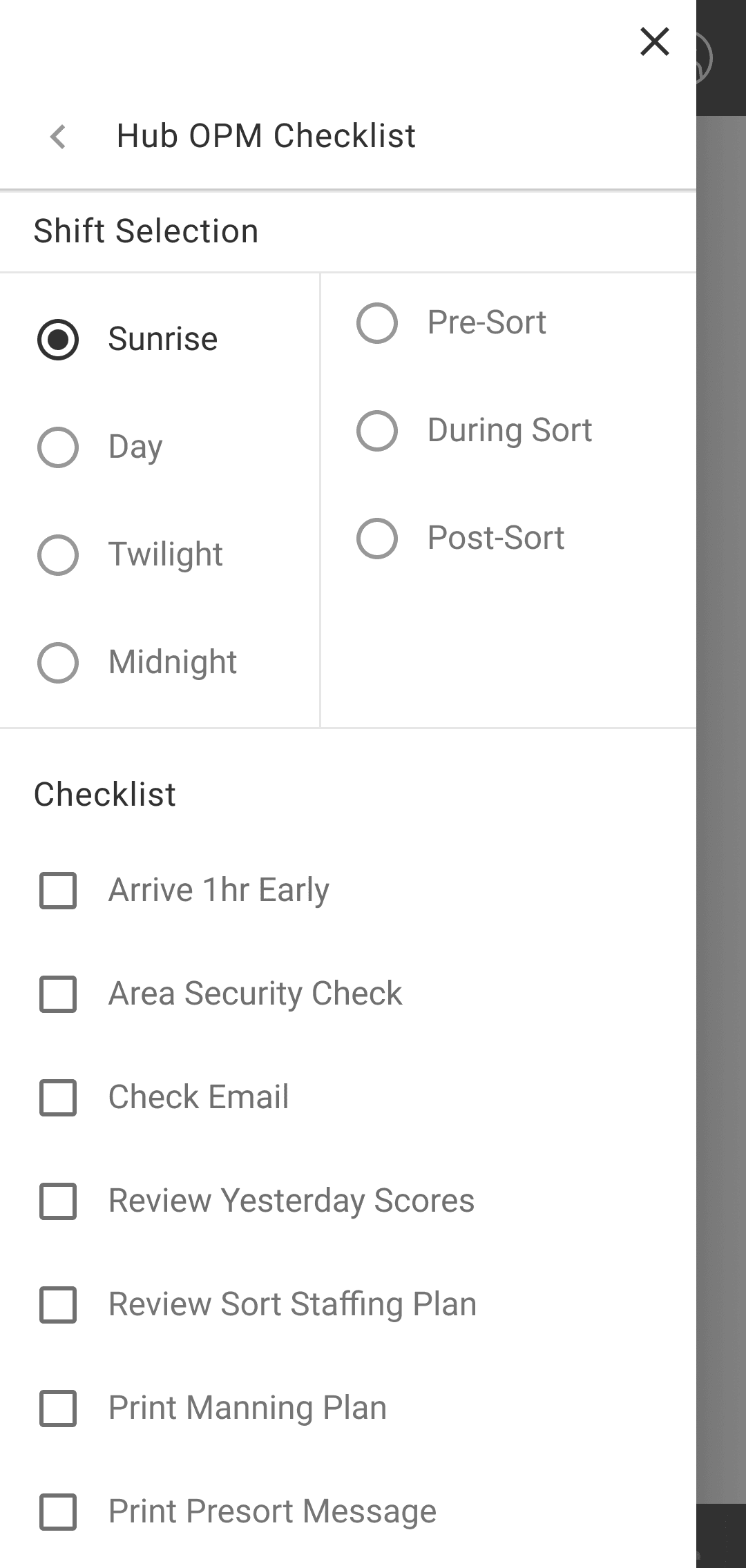
FLOW 04
Safety Checklist
Payoff: completion + incident audit
DESIGN SYSTEM
One system, two modes, eight atoms.
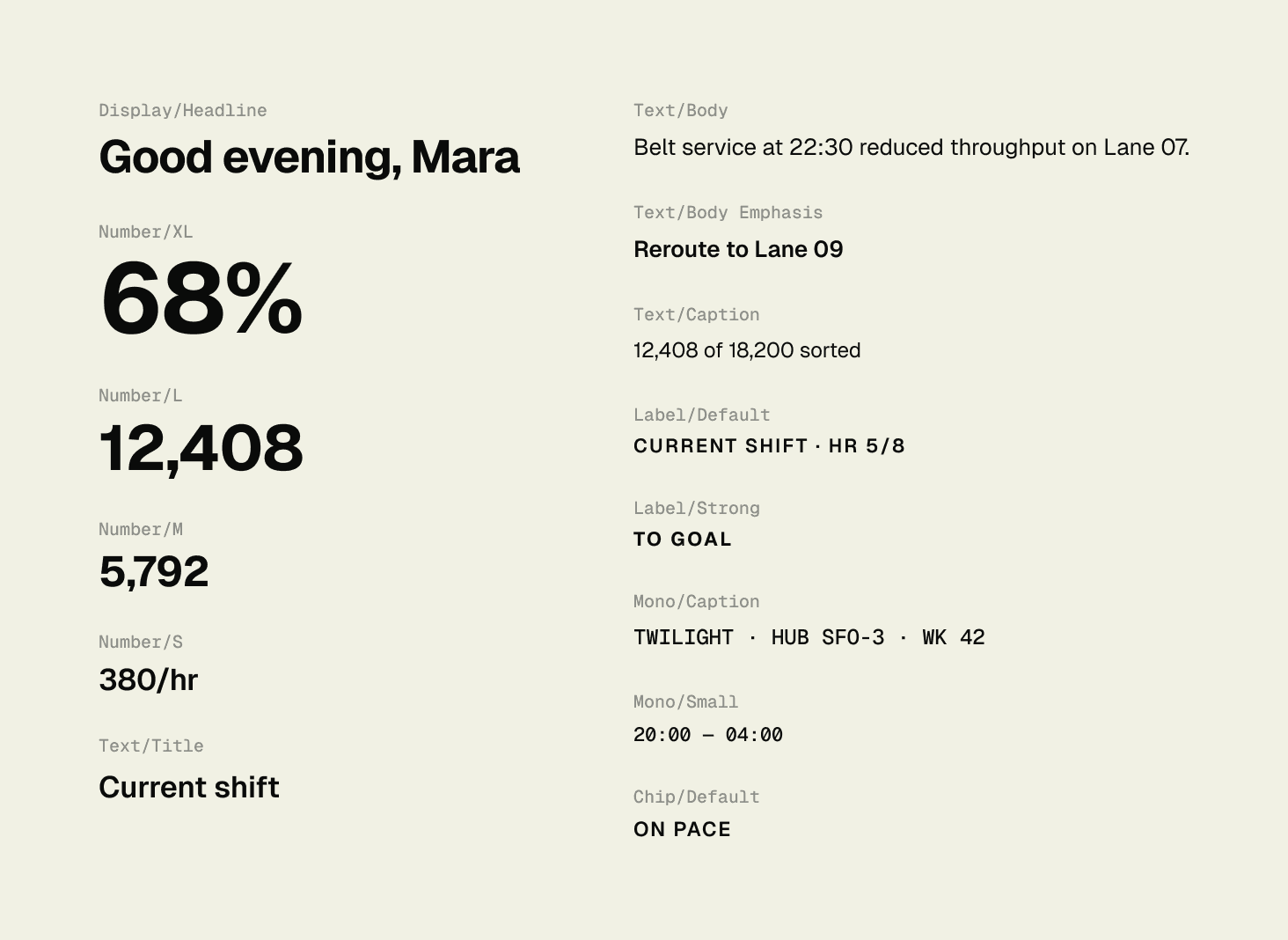
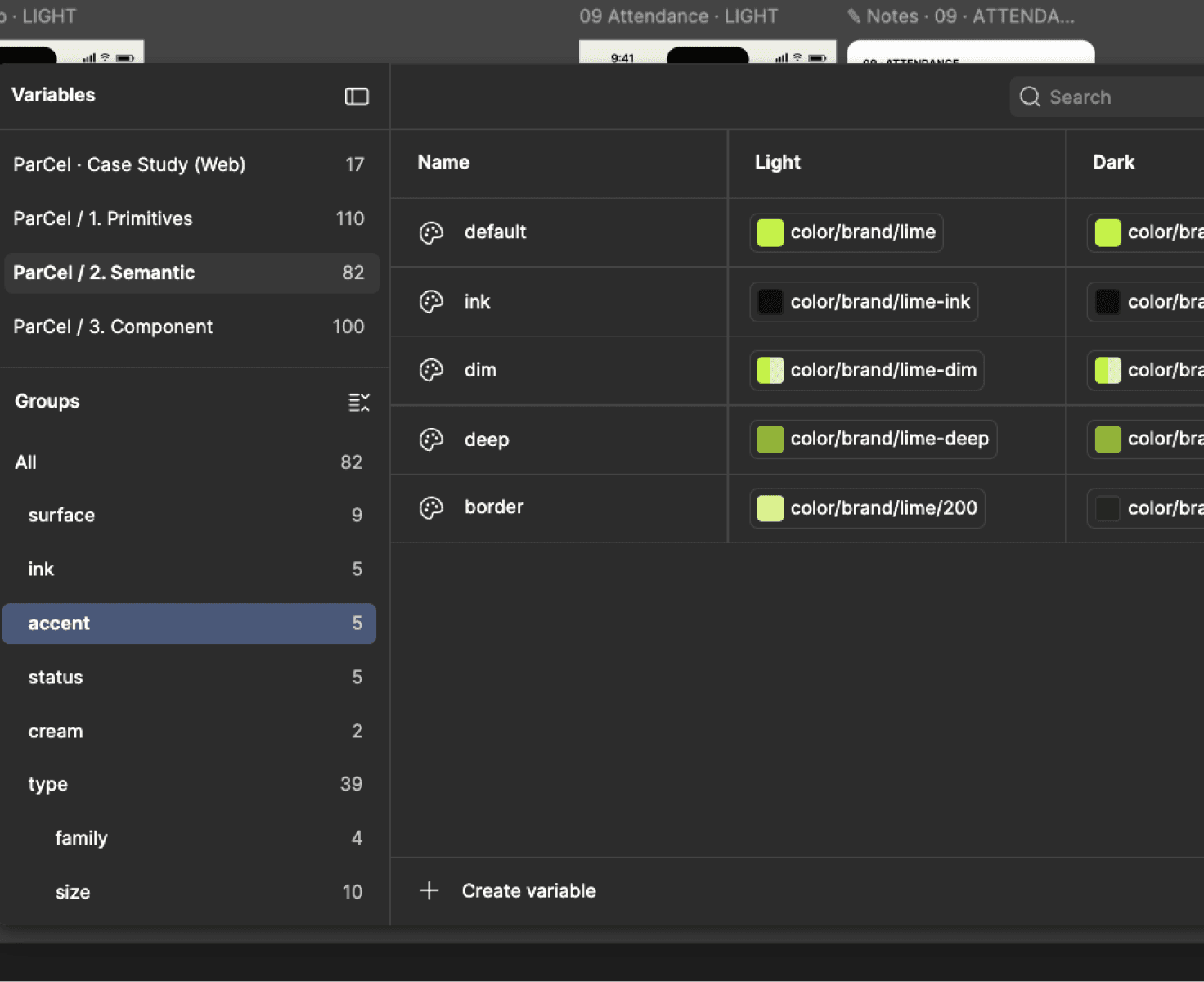
ParCel runs on a small, strict system, so every screen reads the same way at a glance. Geist sets the type for display, body, and numbers; Geist Mono handles codes, lane IDs, and timestamps; Source Serif 4 is there as an optional old-style numeral. Lime is the default accent and can be retuned to four other swatches, but the status colors, warn-red and info-blue, stay fixed. Light and dark are siblings, not a parent and a tint; each owns its full ink and surface scale. Eight atoms do almost all the work, and the whole thing sits on a three-tier token system, so swapping the typeface or flipping a mode is a single change.
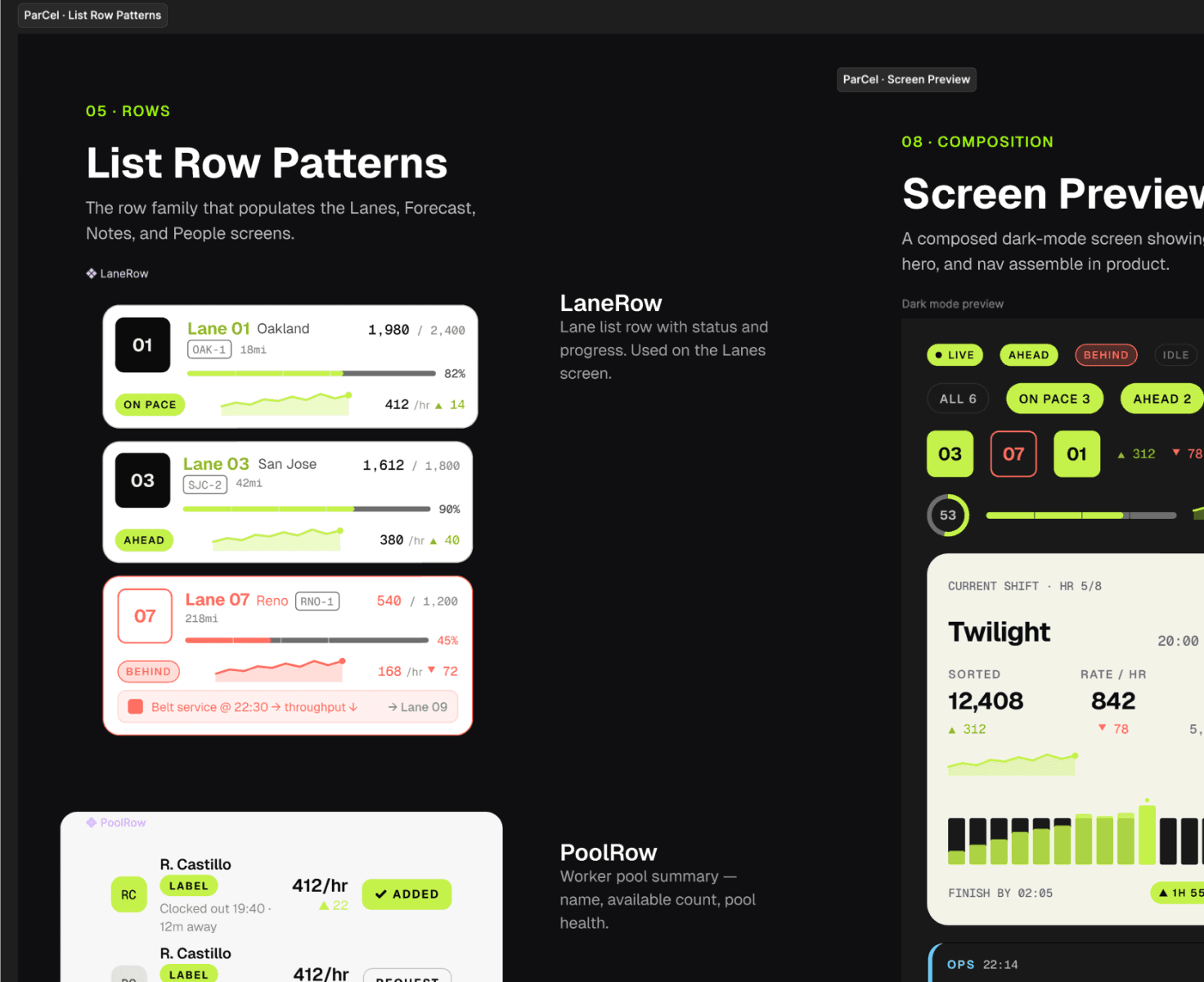
ATOMS · BUILD REFERENCE
StatusPill
Sparkline
BurndownChart
SegBar
Delta
LaneTile
Avatar
Ticker
ShiftRing
NUMBER SCALES
Hero KPI 30px · screen-level sort percentage 56px
WHAT MADE THIS HARD
Four constraints that shaped the work.
01
PLATFORM
WHAT HAPPENED
The project began as a desktop web app, then pivoted to Android mobile mid-stream.
TRADE-OFF / DECISION
Rebuilt the IA for one-handed, glanceable use on the floor. The pivot was the insight.
02
CONTEXT
WHAT HAPPENED
The user is on a 1000-lux floor at 2am, moving, often gloved.
TRADE-OFF / DECISION
Numbers, a status color, and a status verb. No dense tables, no color-only signals.
03
STAKEHOLDERS
WHAT HAPPENED
Workshops spanned regional, facility, ops, and handler, each wanting their own view.
TRADE-OFF / DECISION
Role-aware JTBD, with the Operations Manager set as primary and the others secondary.
04
SCOPE & NDA
WHAT HAPPENED
A real client, a 6-month window, and an NDA.
TRADE-OFF / DECISION
Ship the MVP that clears all four discovered problems; document the rest as backlog.
TEST & REFINE · 5 SESSIONS · 3 REDESIGNS
The floor sent us back to redraw.
We put working screens in managers' hands under shift conditions: phone in one hand, on the move. Fifty-plus observations sorted down to the handful worth a rebuild. Three of them changed the design.
REDESIGN 01
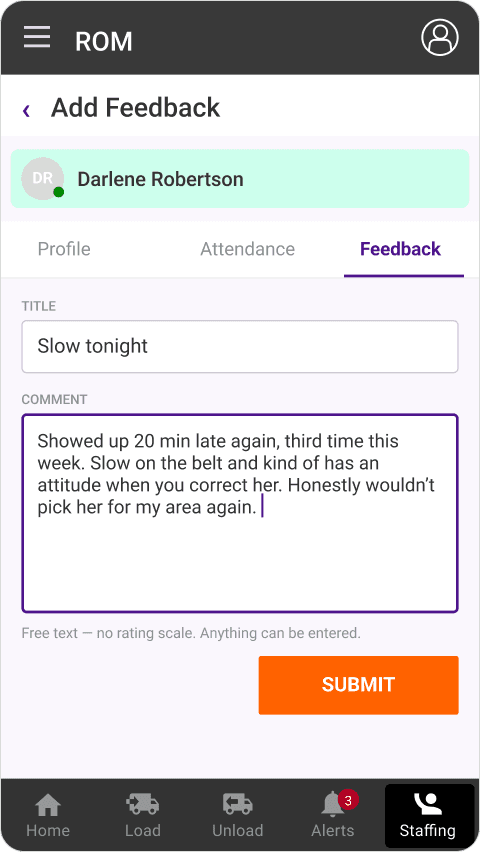
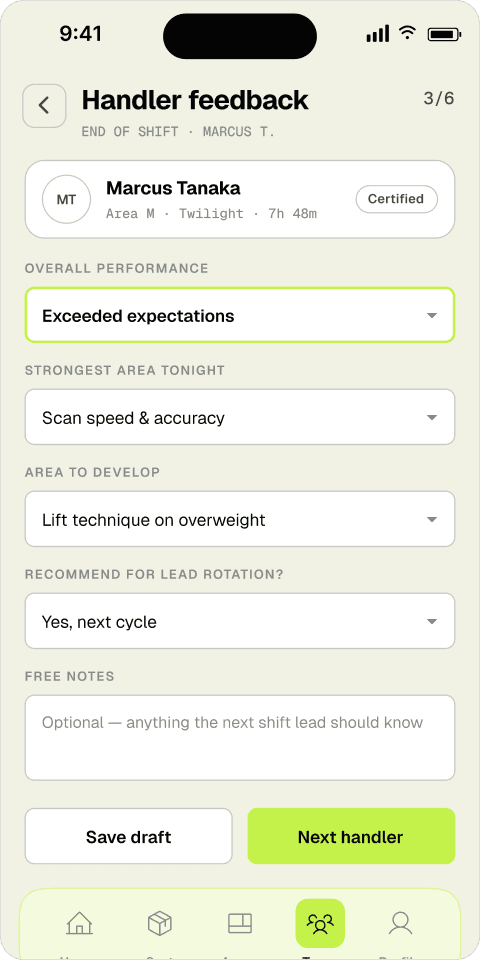
Grading a borrowed handler
BEFORE
AFTER
WHAT TESTING SURFACED
Every handler we tested typed a sentence or two, then stopped and asked what the lead was actually supposed to do with it. The free-text box captured a mood, not a signal. Two leads said they skim these at 4 a.m. A paragraph is the last thing they want mid-shift.
“I can write ‘good worker’ but that tells the next lead nothing. Tell me what to rate — speed, safety, whatever — and I’ll tap it. I’m not writing an essay at the end of a twilight.”
Renata · Twilight sort lead · Usability test, 05/24
“If there’s no scale, everybody grades different. My ‘fine’ is somebody else’s ‘great.’” — Glen, dock handler
WHAT CHANGED
The free-text box became structured prompts: overall performance, strongest area, area to develop, lead-rotation flag, each a tap, not a sentence. Notes are now optional. A lead finishes a handler in under fifteen seconds and the next shift reads a signal, not a paragraph.
REDESIGN 02
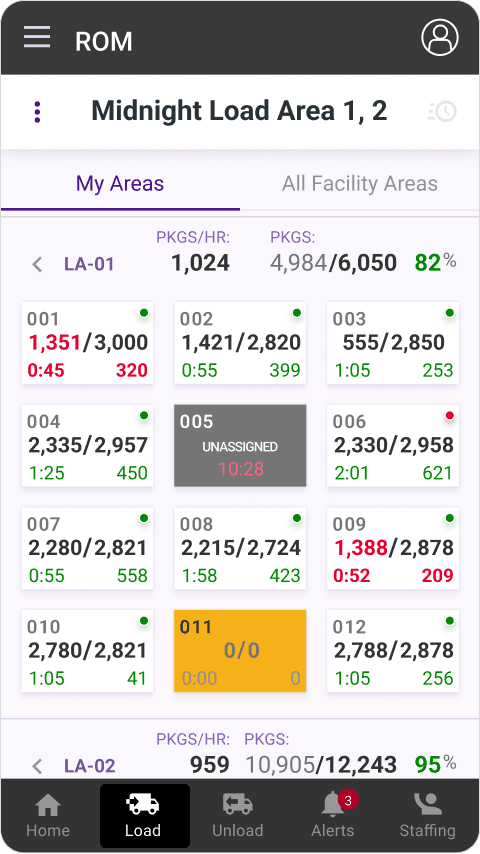
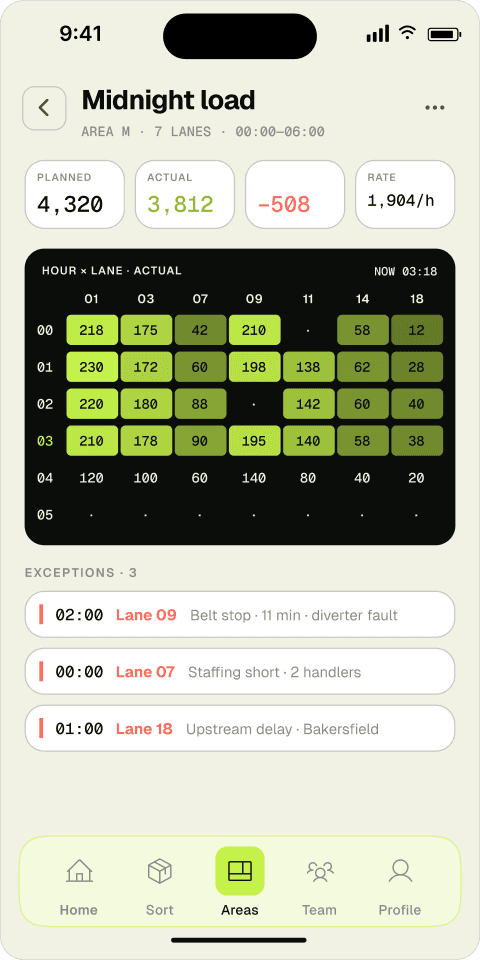
Which doors are actually behind?
BEFORE
AFTER
WHAT TESTING SURFACED
The grid showed a number for every door, but testers couldn’t tell a healthy door from a failing one without reading each cell. Managers scanned left to right doing the math in their heads, and still missed the two doors that were red. The data was all there; the priority wasn’t.
“There’s twelve numbers on here and they all look the same weight. I need the floor to jump out at me — show me the three doors killing my hour, not all twelve at once.”
Mara · Operations manager · Usability test, 05/24
“By the time I’ve read every box the belt’s already backed up. I want to glance, not study.” — Cody, unload supervisor
WHAT CHANGED
Raw per-door counts became an hour-by-lane heatmap. Actuals fill in green, gaps stay dark, and exceptions surface as their own list below. A manager sees the shape of the shift in one look and reads the problem lanes by name: belt stop, staffing short, upstream delay.
REDESIGN 03
Where do I even start?
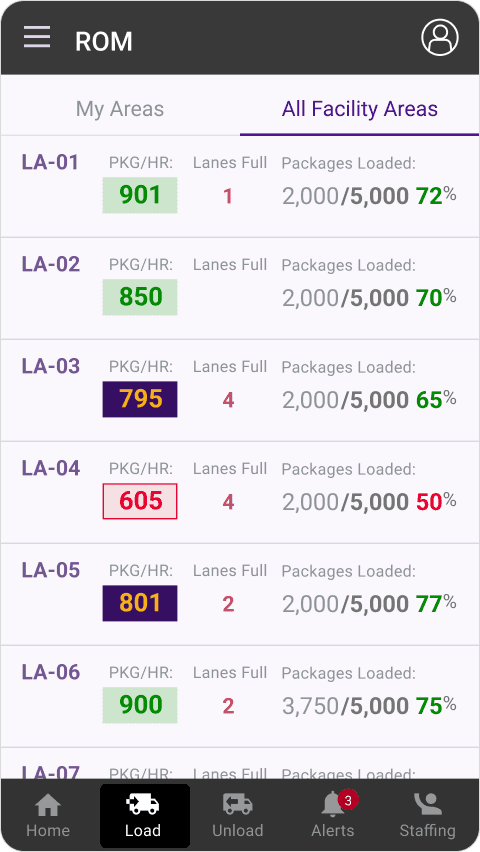
BEFORE
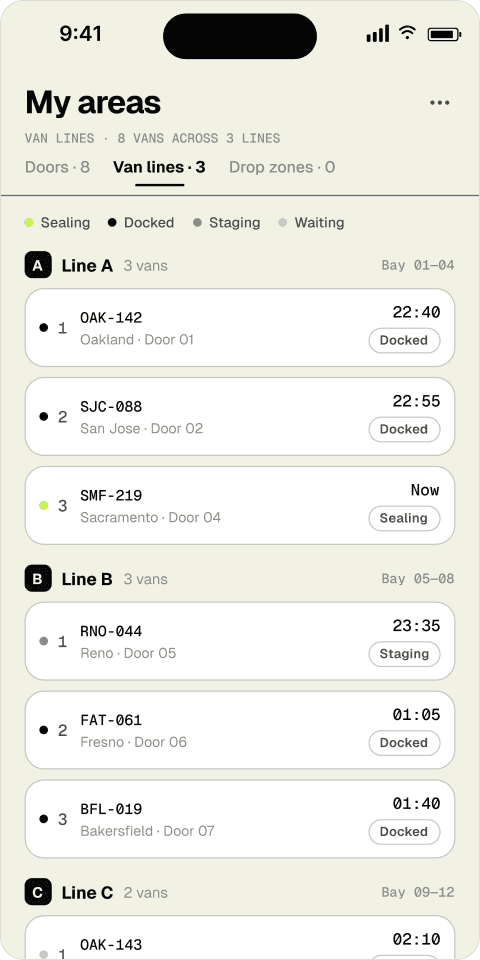
AFTER
WHAT TESTING SURFACED
The all-areas view listed every facility area with the same visual weight: pkg/hr, lanes full, percent loaded, all in one flat row. Testers said it read like a spreadsheet. Nobody could answer the only question that mattered at start of shift: which van do I work first?
“It’s all numbers and they’re all gray. I’m hunting for the one about to seal and I can’t find it without reading every line. Just group them — tell me what’s docked, what’s waiting.”
Marcus · Facility manager · Usability test, 05/24
“Percent loaded doesn’t help me at 2 a.m. Status does — is it docked, is it sealing, is it gone?” — Junie, load coordinator
WHAT CHANGED
The flat facility list became van lines grouped by bay, each van carrying a plain-language status (Docked, Sealing, Staging, Waiting) and a real departure time. The percent-loaded math moved to the background. The first thing you see now is what’s about to leave.
5
moderated sessions · ops + facility managers
50+
observations logged
3
redesigns shipped
~10
iterations per screen
OUTCOME & LEARNINGS
A real system, ready to build.
ParCel covers the operations manager’s night in 14 screens (10 canonical plus 4 ops flows), in both light and dark, on a component library and a three-tier token system, backed by three personas and their jobs-to-be-done. There’s enough here to hand to engineering and keep building.
01
A naked number is a bug.
At 2am, a number with nothing to compare it to is just noise. Every primary figure on screen earns a delta, a sparkline, or a goal it’s measured against.
02
Status is a color and a verb.
Lime and warn-red never work alone; they ride with ON PACE, AHEAD, and BEHIND. The color catches the eye, the word carries the meaning, and nobody reads the floor on color alone.
03
Meet the manager where they work.
The whole project hinged on one pivot: the fix wasn’t a sharper dashboard at the desk, it was real-time in the hand, out on the floor.